Java4Shell (CVE-2026-114938): Identify Affected Images with Aqua
Overview
Java4Shell (CVE-2026-114938) is a security vulnerability in the OpenJDK HotSpot compiler. The published OpenJDK advisory identifies Java 17, 21, 25, and 27 release lines as affected, with a CVSS v3.1 score of 8.1 (High). Check your Java distributor's advisory for the exact affected and fixed builds, as version numbers and update availability can vary by vendor.
Aqua detection update: CVE-2026-114938 is now available in Aqua's vulnerability feeds, as confirmed by Aqua Engineering. Customers can use native vulnerability scanning and Image Assurance Policies to find images with a matching CVE finding. A custom Rego check is not required for this workflow.
Identify Affected Images in Aqua
1. Configure an Image Assurance Policy
- In the Aqua Console, go to Policies → Assurance Policies.
- Create or edit an Image Assurance Policy covering the images you want to assess.
- Enable CVEs Blocked and add CVE-2026-114938.
- Save the policy. For discovery-only use, review the policy's enforcement and CI/CD actions so your investigation does not unintentionally block deployments or fail pipelines.
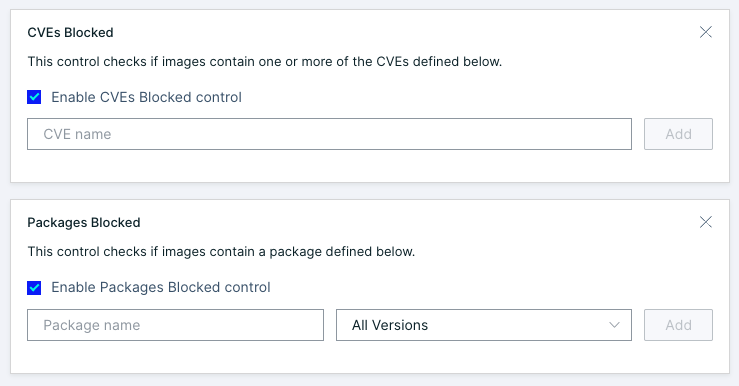
Tip: The built-in Packages Blocked control can also help identify Java versions, but it is not necessary when a supported CVE finding is available. Package-name and version rules may be broader than the actual vulnerability scope and can flag patched images.
2. Rescan Relevant Images
Rescan candidate Java images, especially those last scanned before the updated vulnerability content became available. Review scan completion and any reported CVE findings.
3. Filter the Results
In Image Inventory, filter for images that failed the relevant Image Assurance Policy. Review each matching image's CVE details, Java package/version, registry, and any running workloads.
A failed policy identifies an image that requires attention. If the policy contains multiple controls, review the specific failed check to confirm that the result is due to CVE-2026-114938.
Recommended Actions
- Prioritize affected images deployed in internet-facing or business-critical services.
- Update Java to the fixed version recommended by your Java distributor, then rebuild and redeploy affected images.
- Rescan the updated images and verify that the CVE finding is resolved.
Important: A CVE appearing in Aqua's feeds does not guarantee that every Java distribution or package format is immediately recognized in every image. A missing finding is not proof that an image is unaffected. Confirm your exact Java vendor and runtime version against its advisory, and contact Aqua Support if a known affected image is not being detected.
Additional Resources
[1] OpenJDK Vulnerability Advisory - November 17, 2026
[1] Oracle November 2026 Security Update
Did you find it helpful? Yes No
Send feedback