Configuring the Aqua Windows Scanner in Azure DevOps (ADO)
TABLE OF CONTENTS
- Introduction
- Applicability
- Prerequisites
- Steps/Procedure
- Tips and Tricks
- Troubleshooting
- Conclusion
- Additional Resources
Introduction
This article provides a step-by-step guide on how to configure and use the Aqua Windows Scanner within Azure DevOps (ADO) pipelines. This process allows teams running Windows-based build agents to securely download, publish, and execute Aqua’s scanner binaries as part of their CI/CD workflows. By following the procedures below, users can ensure that container images and artifacts are scanned automatically during their build process.
Applicability
This KB article applies to:
Aqua Self-Hosted Edition
Aqua SaaS Edition (Aqua Cloud)
The instructions are valid for all current, supported Aqua versions unless otherwise specified.
Prerequisites
Before beginning, ensure you have the following:
Azure DevOps (ADO) organization and project
Azure CLI installed and authenticated (
az login)Access credentials to download Aqua Windows scanner binaries
Permissions to publish and consume ADO Artifacts (Universal Packages)
A Windows build agent capable of running
.exebinaries
Steps/Procedure
Step 1: Download the Latest Windows Scanner Binary
Run the following command to download the Windows scanner package for Azure DevOps:
wget --user <username> --password <password> https://download.aquasec.com/windows-scanner-vsts/2022.4.836/AquaScannerWindowsInstaller.2022.4.836.vsts.zip
Replace <username> and <password> with your Aqua credentials.
Step 2: Extract Scanner Files
Unzip the downloaded file:
AquaScannerWindowsInstaller.2022.4.836.vsts.zip
Store the extracted .exe files in a new directory that will later be published as an ADO artifact.
Step 3: Authenticate to Azure
Perform an Azure login to ensure your CLI environment is authenticated:
az login
Step 4: Publish the Scanner Binaries as an Azure DevOps Artifact
Use Azure’s Universal Packages feature to publish the scanner executables as an artifact:
az artifacts universal publish \
--organization <ado-organization> \
--project <ADO-project> \
--scope project \
--feed <feed-name> \
--name <package-name> \
--version <image-version-or-tag> \
--path <local-path-where-exe-files-are-stored> \
--description "Scanner CLI binaries for Windows"
For detailed instructions on Universal Packages, refer to Microsoft documentation:
https://learn.microsoft.com/en-us/azure/devops/artifacts/quickstarts/universal-packages
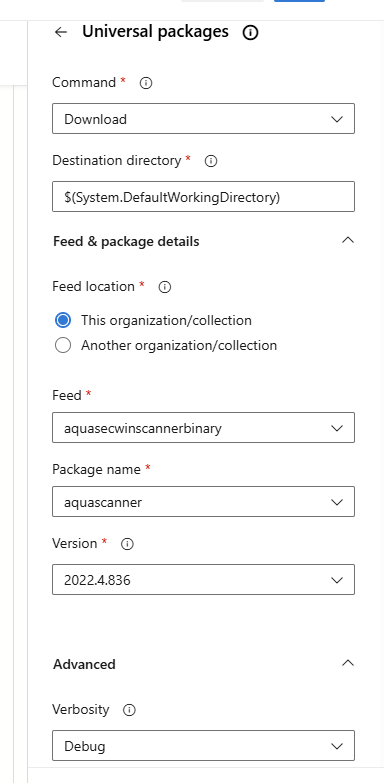
Step 5: Add Universal Package Task to Your Pipeline
In your ADO pipeline YAML, add a Universal Package download task before the Aqua scanning step. This makes the scanner executable available at runtime:
- task: UniversalPackages@0
inputs:
command: 'download'
downloadDirectory: '$(Build.SourcesDirectory)/aqua-scanner'
feed: '<feed-name>'
package: '<package-name>'
version: '<image-version-or-tag>'
Then, follow with your Aqua scanner task referencing the downloaded binaries.
Save the pipeline and trigger a new run.
Step 6: Validate the Scan Execution
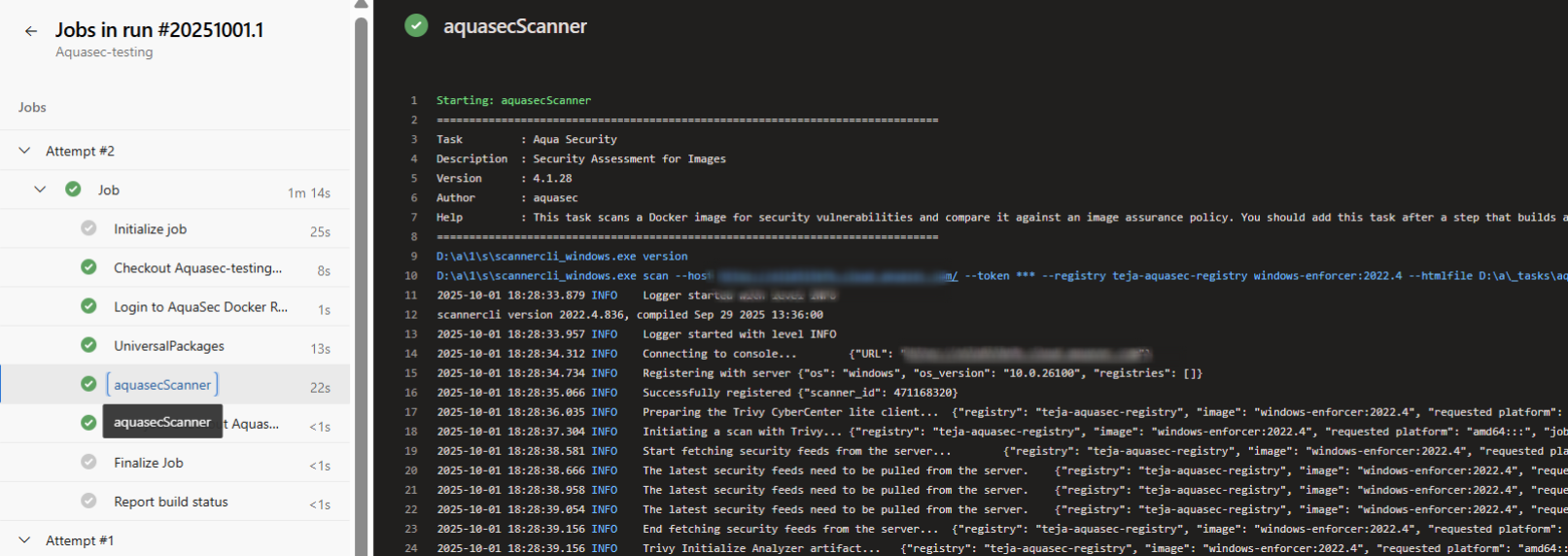
After the pipeline runs:
Review the scan logs
Confirm that the Windows scanner executed successfully
Ensure container images or artifacts were scanned as expected
Tips and Tricks
Keep scanner binaries updated by periodically downloading the latest version.
Store scanner binaries in a dedicated artifact feed to simplify long-term maintenance.
Use secure variable groups in ADO to store Aqua credentials and registry tokens.
Ensure your Windows build agent has sufficient permissions and disk space.
Troubleshooting
| Issue | Possible Cause | Resolution |
|---|---|---|
| Pipeline cannot download package | Incorrect feed or package name | Validate artifact feed configuration and version |
| Authentication failures | Azure CLI not logged in | Run az login before publishing or downloading |
Conclusion
Configuring the Aqua Windows Scanner in Azure DevOps allows teams to enforce consistent security checks within their CI/CD pipelines. By publishing the scanner as a Universal Package and integrating it into your pipeline workflow, you ensure that every build is scanned efficiently and securely.
Additional Resources
This section can provide links to related articles or other useful resources for further information on the topic.

Did you find it helpful? Yes No
Send feedback