Shai-Hulud 2.0 Supply-Chain Attack
Update Status: This KB is actively maintained by Aqua Security. Updates will be added as new information, indicators, or mitigation steps are confirmed.Overview
In mid-September 2025, Aqua Nautilus researchers discovered a sophisticated supply-chain malware campaign—Shai-Hulud—targeting the npm ecosystem. The malware was embedded in seemingly legitimate JavaScript package updates, executed on installation, harvested developer and CI/CD credentials, exfiltrated data, and used stolen tokens to publish further malicious package versions. Because this attack compromises the software supply chain rather than a single endpoint, it poses elevated risk: malicious packages can steal keys and move laterally into cloud environments and source repositories.
Timeline
- Late Aug 2025: Precursor credential compromise S1ngularity/Nx grants attacker foothold.
- 15–16 Sep 2025: Rapid propagation—dozens to hundreds of npm packages compromised.
- 23 Sep 2025: CISA issues alert; campaign estimated to affect 500+ npm packages.
- Post-mid Sep: Ongoing discovery of additional infections.
- 24 Nov 2025: Second wave “Second Coming” occurs just before npm’s token-revocation deadline.
Malicious Packages Feed
- Trivy customers have had coverage over the course of this attack thanks to our OpenSSF Feeds
- Offline or air-gapped customers are also covered and should use the latest offline CyberCenter image.
- Classic Scanning Customers will need the latest CyberCenter updates which are published as of this article.
- To ensure high data fidelity and reduce false positives, Aqua only reports malicious packages when multiple reputable sources confirm the threat.
- In practice, this means a package must appear in the OpenSSF Malicious Packages feed and be corroborated by GHSA or another trusted source. This cross-validation ensures alerts are accurate, reliable, and actionable.
Leveraging Supply Chain Security
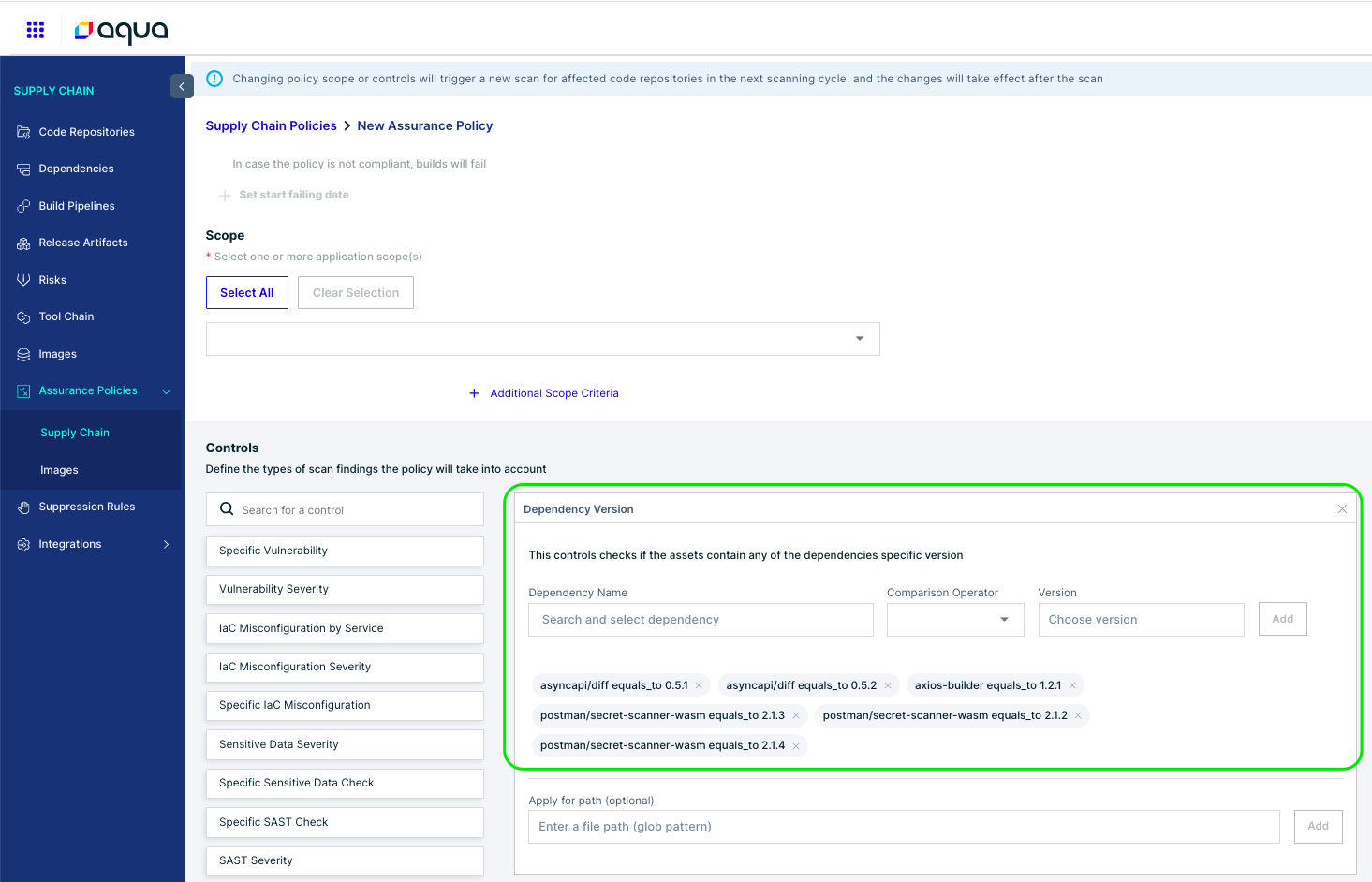
We can configure a "Assurance Policy" within Supply Chain, to catch these resources before they are built into actual workloads. To do this...
1. Navigate to "Supply Chain > Assurance Policies > Supply Chain"
2. Select -or- Create your Assurance Policy, revealing the policy controls
3. Check the Dependency Version Control, and declare the vulnerable package(s) and version(s) we wish to detect.
Below we use "asyncapi/diff" with affected versions 0.5.1 and 0.5.2 and "postman/secret-scanner-wasm" with affected versions 2.1.2, 2.1.3 and 2.1.4 as examples for Dependency Name(s) and Version(s).
Leveraging Image Scans (Trivy & Classic)
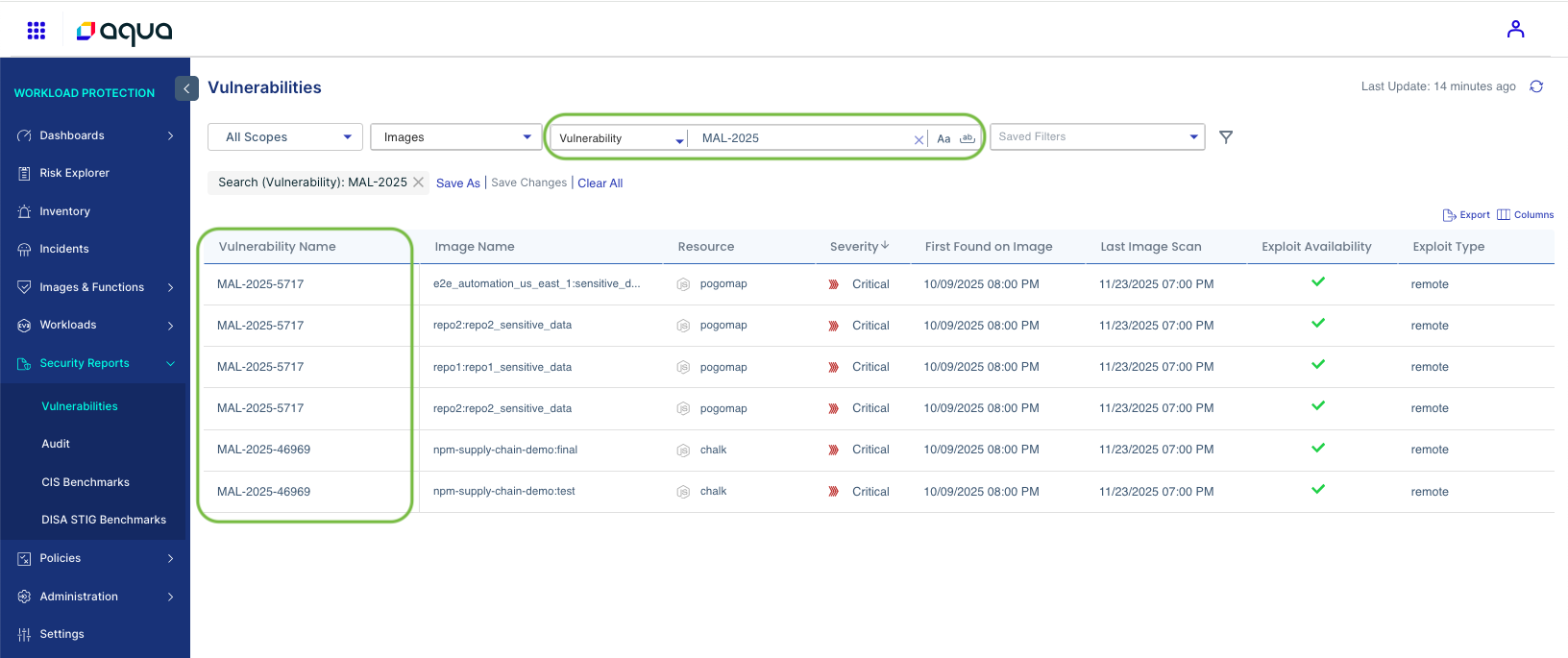
We can leverage the "MAL-2025" Vulnerability Wildcard in our Search to discover compromised packages - which will populate after a image rescan (Autopull, Manual Scans, etc).
Here is an example of a swath of impacted images using the "MAL-2025" Vulnerability ID mentioned above - Found on the Vulnerabilities Page of Aqua Hub, Or Workload Protection > Security Reports > Vulnerabilities.
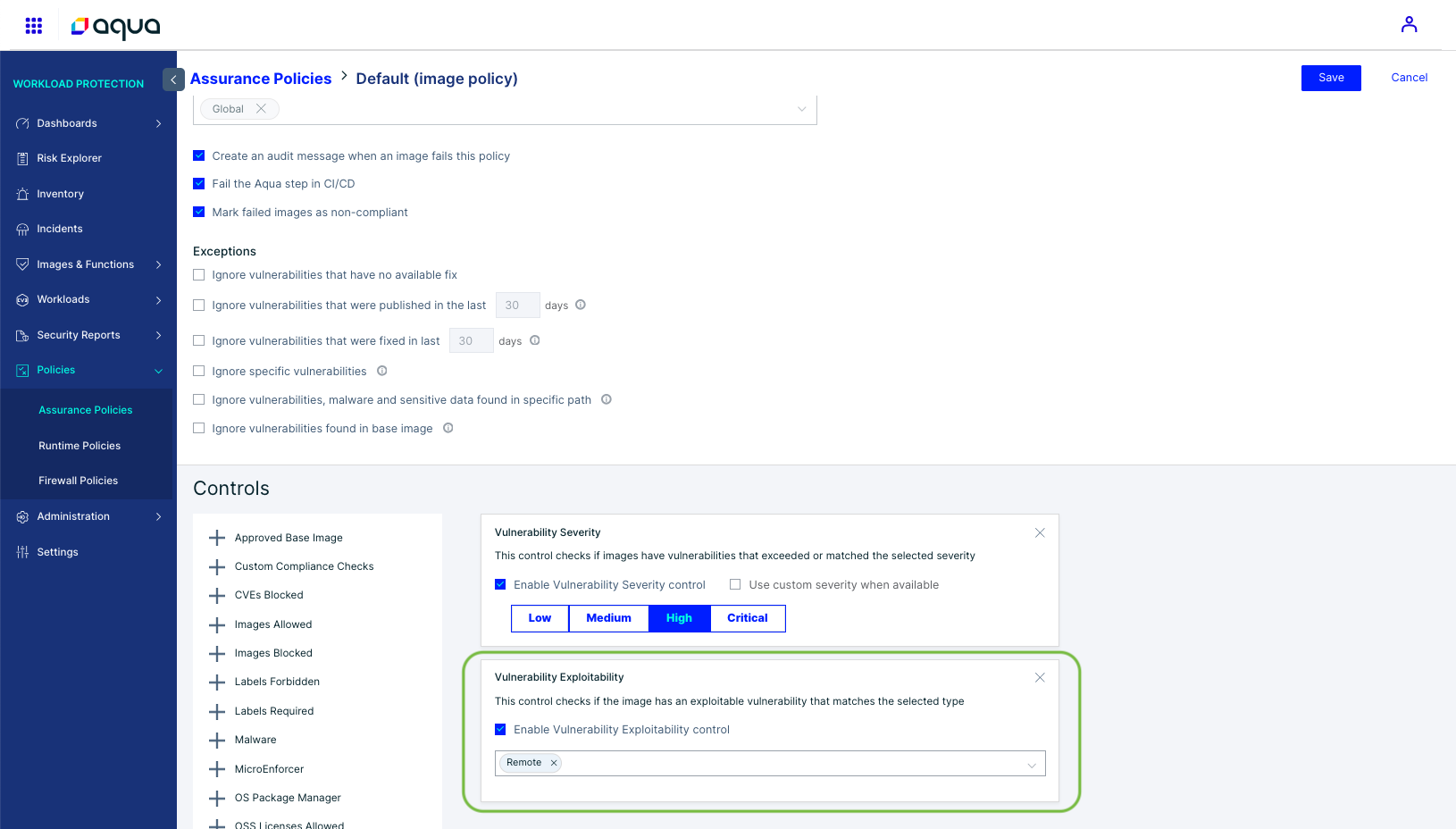
TO BLOCK:
We can define an Image Assurance policy to take of advantage that these packages are automatically marked as "Remote" Exploitable with a Severity of greater-or-equal to High.
A Note About CyberCenter Vulnerabilities
Aqua’s detection system leverages multiple industry-standard identifiers, as well as Aqua-specific identifiers, to ensure that security risks are flagged quickly and comprehensively. For Shai-Halud 2.0 -- we rely on our OpenSSF Malicious Package Feeds.
Malicious Package Feed (OpenSSF Standard)
Aqua integrates with the OpenSSF Malicious Packages Database, which tracks compromised or intentionally malicious packages in open-source repositories.
- Format: MAL-YYYY-XXXXX
Example:
How Detections Appear in Aqua Reports?
- All identifiers (CVE, AQUA, MAL, etc.) appear in the Vulnerabilities tab of scan results.
- Each detection is assigned a severity level and score, ensuring it integrates seamlessly into Assurance Policy evaluation for image compliance.
- Customers can filter by identifiers (CVE-*, AQUA-*, MAL-*, etc.) within the platform as well as generate reports on malicious packages using our Reporting mechanism
Using On-Prem CyberCenter?
1. Fetch the latest CC update after Nov 25, 2025 which includes these updates, before proceeding.
2. Make sure you check back in every 24hrs for possible updates!
Leveraging Runtime Controls With Aqua Enforcer
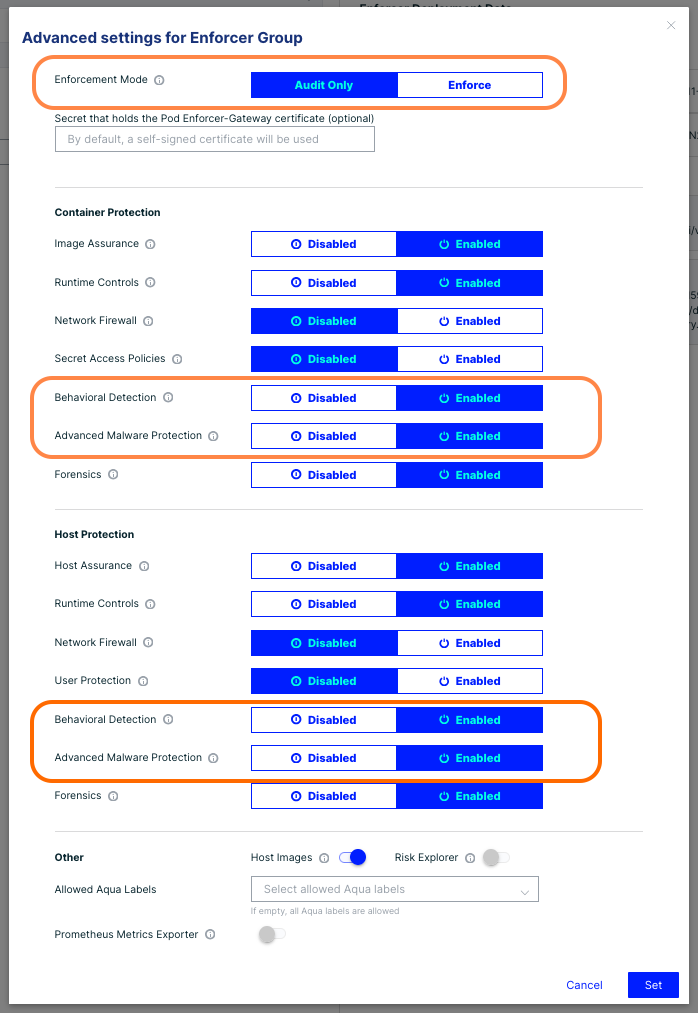
For security at runtime we can leverage Advanced Malware Protection (AMP).
To begin our configuration...
1. Ensure the AMP module is enabled under the Administration > Enforcer > Enforcer Groups > "Applicable Enforcer Group Name" > Advanced Settings.
2. If you wish to block these events, "Enforcement Mode" at the top should be set to "Enforce", otherwise we will only Audit these events.
NOTE: Enforcers deployed with a memory limit of less than 1.5gb of memory may face challenges if AMP is enabled for the first time, as this requires some additional resources -- we strongly recommend a review of our Sizing Guide for more details.
Advanced Malware Protection (AMP)
Using the Advanced Malware Protection engine, we have an updated Signature Set looking for known shai-hauld 2.0 impacted packages & hashes. You can check the latest Malware Signature Set available in the UI under "Workload Protection > Settings > Malware Protection"
Shai-Halud 2.0 Example Hashes
"a3894003ad1d293ba96d77881ccd2071446dc3f65f434669b49b3da92421901a"

"f099c5d9ec417d4445a0328ac0ada9cde79fc37410914103ae9c609cbc0ee068"

"62ee164b9b306250c1172583f138c9614139264f889fa99614903c12755468d0"
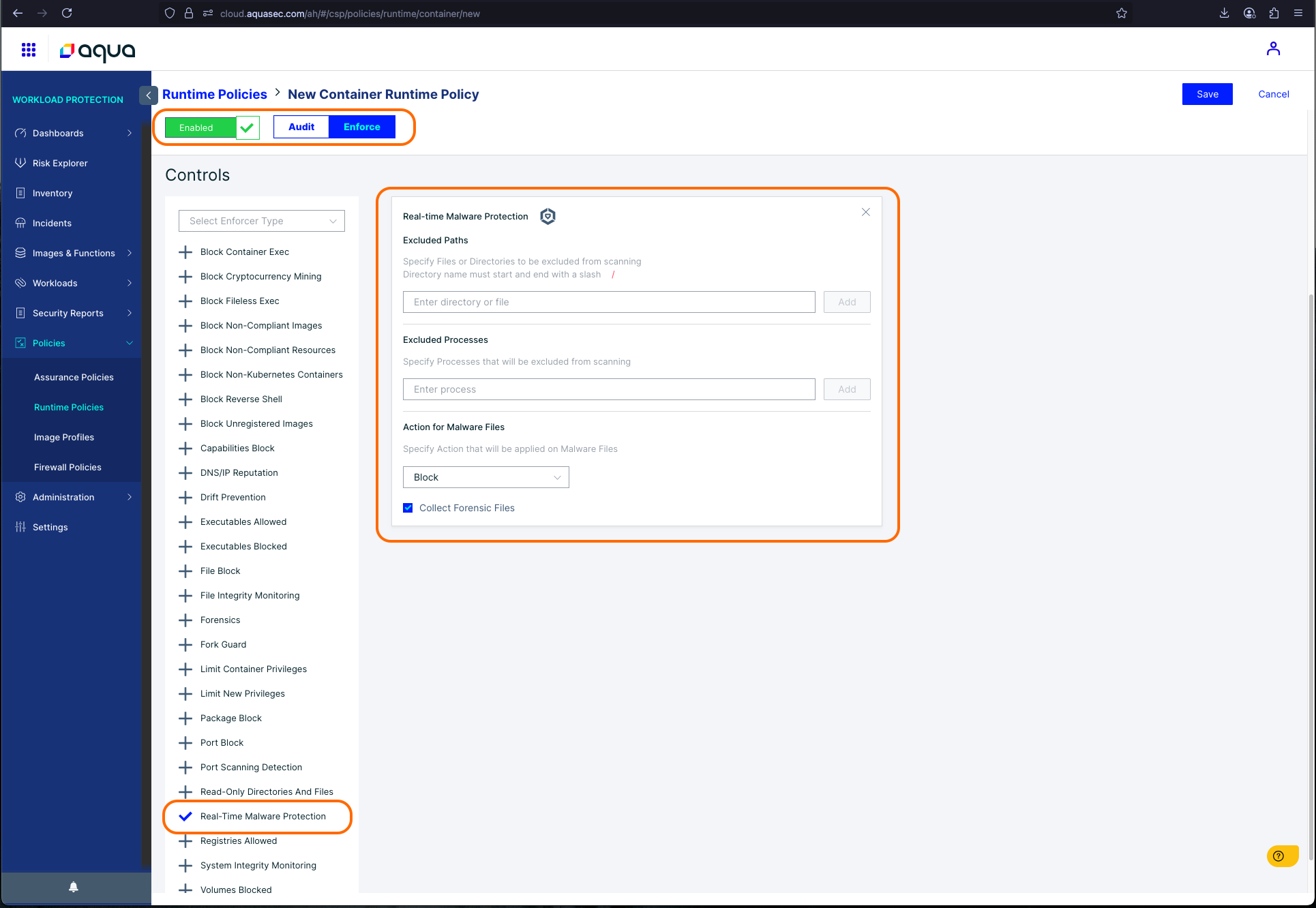
To Configure the AMP Runtime Policy...
1. Navigate to Workload Protection > Policies > Runtime Policies > "Your Container Policy Name"
2. Ensure the Policy Enforcement Mode is set to "Audit" or "Enforce" as desired.
3. Check the "Real-time Malware Protection" Control
4. Repeat these steps for the "Host Runtime Policy" if also desired - the host control is named identically.
Recommended Actions
- Enable Behavioral Detections and Advanced Malware Protection to protect against attacks in real-time
- Use Real-time Malware Protection to alert/detect/delete malicious files based on malware signatures for Shai Hulud attacks.
- Review Assurance Policies to ensure exploitable CVEs and MAL-IDs are blocked.
- Use the “CVEs Blocked” control to block specific MAL-IDs.
- Verify severity and exploitability controls within Image Assurance Policies.
- Rescan all images (or allow the nightly scan) to identify non-compliant assets.
- Review flagged vulnerabilities in the Vulnerabilities view for affected npm packages.
- Validate non-compliant images in the Inventory view and remediate as needed.
- Rotate credentials for developers or CI/CD services that may have interacted with infected packages.
- Rebuild affected images using trusted and verified dependencies.
Learn More
Did you find it helpful? Yes No
Send feedback