HOWTO: Secure compromised NPM packages w/ Aqua Enterprise
"A new software supply chain attack is targeting a series of highly popular open-source NPM packages unleashing malware across 18 foundational JavaScript packages that collectively accounted for a staggering 2.6 billion weekly downloads. This incident highlights how a compromised open-source package can quickly reach production environments, emphasizing the importance of visibility, security controls, and proactive defenses across your software supply chain." ~ https://www.aquasec.com/blog/npm-software-supply-chain-critical-threat/
The following KB is how we can configure the Aqua Enterprise suite, to ensure these compromised NPM packages are discovered, and BLOCKED in your environments.
Leveraging Supply Chain Security
We can configure a "Assurance Policy" within Supply Chain, to catch these resources before they are built into actual workloads. To do this...
1. Navigate to "Supply Chain > Assurance Policies > Supply Chain"
2. Select -or- Create your Assurance Policy, revealing the policy controls
3. Check the Dependency Version Control, and declare the vulnerable package(s) and version(s) we wish to detect.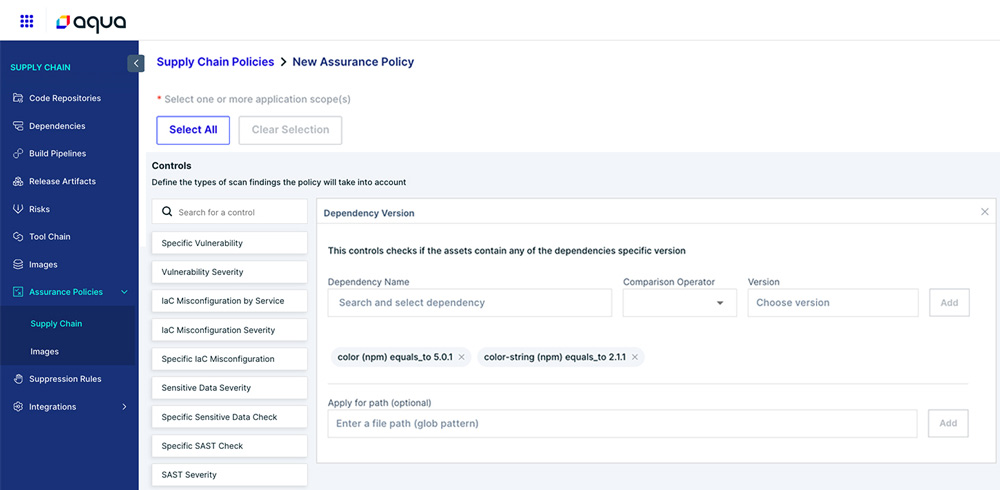
IMPORTANT: Aqua is working on updating the SCS Trivy Agent to detect this (growing) list of packages automatically to save you populating this list "by hand" - but this is still under construction. This includes some dependencies "missing" from the dropdown declared in the Shai-Halud attack.
Leveraging Image Scans (Trivy & Classic)
Aqua has created a "custom" vulnerability named "AQUA-NPM-MALWARE" for these compromised Javascript Packages. Overcoming the missing CVE's available as of this KB. Here is an example of one of these Resource Detections from a selected image on our "Images" Page in our UI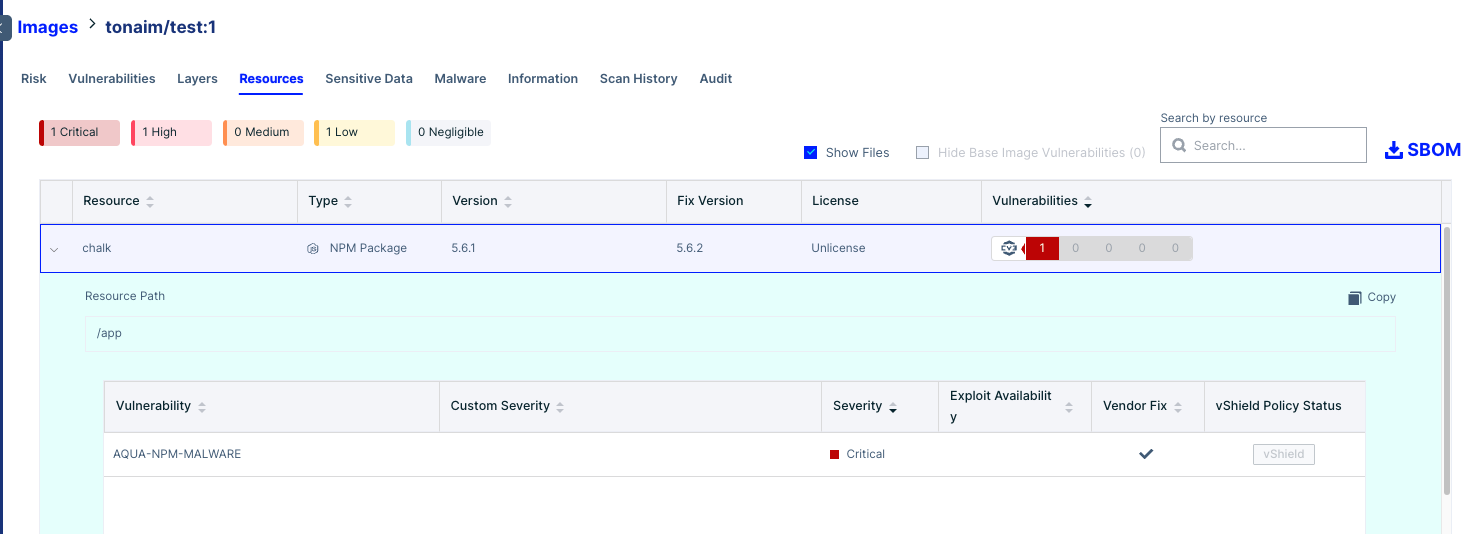
And here is an example of the same detection, discovered using the "AQUA-NPM-MALWARE" Vulnerability, on the Vulnerabilities Page found on Aqua Hub, Or Workload Protection > Security Reports > Vulnerabilities.
Using On-Prem CyberCenter?
1. Fetch the latest CC update after Sep 18th, 2025 which includes this Custom Vulnerability set, before proceeding.
2. Make sure you check back in everyone 24hrs for possible updates, we are actively expanding the impacted resource list, as new packages are reported.
To take advantage...
1. Simply rescan your images (Autopull, Manually via UI, etc) and Aqua will flag any Image containing the known NPM compromised resources with the following details...
- ID: AQUA-NPM-MALWARE
- Severity: Critical
- CVSSV3 score: 9.8
- CVSSv4 score: 9.3
Remediation details are also included, specific to the compromised packages, noting to upgrade to the latest version available.
To BLOCK these images, we can configure an Image Assurance Policy that matches against any of the above specs that best fit your existing Security Policy.
Regarding CyberCenter Additions:
Aqua’s detection system leverages multiple industry-standard identifiers, as well as Aqua-specific identifiers, to ensure that security risks are flagged quickly and comprehensively.
Industry-Standard Identifiers
1. CVEs (Common Vulnerabilities and Exposures)
- Format: CVE-YYYY-XXXXX
- Universally recognized identifier for vulnerabilities.
- Example:
- CVE-2024-10256
2. Security Advisories
- Vendor or ecosystem-specific advisories for vulnerabilities.
- Common formats include RHSA (Red Hat Security Advisory) and GHSA (GitHub Security Advisory).
- Examples:
- RHSA-2024-3178
- GHSA-q95w-c7qg-hrff
Aqua-Specific Identifiers
When official CVEs or advisories are unavailable or when threats are highly ecosystem-specific, Aqua creates its own identifiers.
- Naming convention: Always starts with "AQUA-"
Usage:
- Temporary detections for urgent threats before CVEs exist.
- Ecosystem/package-specific detections for targeted attacks (e.g., NPM, MCP).
Examples:
- AQUA-LOG4SHELL – temporary detection for Log4Shell before a CVE was assigned.
- AQUA-MCP-PHANPAKPOSTMARK – attack on the postmark MCP package by a malicious account Phanpak.
- AQUA-NPM-MALWARE – injected malware in NPM packages.
These identifiers are always paired with a clear description, ensuring that the detection is specific rather than generic.
Malicious Package Feed (OpenSSF Standard)
Aqua integrates with the OpenSSF Malicious Packages Database, which tracks compromised or intentionally malicious packages in open-source repositories.
- Format: MAL-YYYY-XXXXX
Example:
How Detections Appear in Aqua Reports?
- All identifiers (CVE, AQUA, MAL, etc.) appear in the Vulnerabilities tab of scan results.
- Each detection is assigned a severity level and score, ensuring it integrates seamlessly into Assurance Policy evaluation for image compliance.
- Customers can filter by identifiers (CVE-*, AQUA-*, MAL-*, etc.) within the platform as well as generate reports on malicious packages using our Reporting mechanism
Leveraging Runtime Controls with Aqua Enforcer
For security at runtime, we have two options available to us. Advanced Malware Protection (AMP) and Behavioral Detection.
To being our configuration...
1. Ensure these Modules are are enabled under the Administration > Enforcer > Enforcer Groups > "Applicable Enforcer Group Name" > Advanced Settings.
2. If you wish to block these events, "Enforcement Mode" at the top should be set to "Enforce", otherwise we will only Audit these events.
NOTE: Enforcers deployed with a memory limit of less than 1.5gb of memory may face challenges if these two modules are enabled for the first time, as they require additional resources.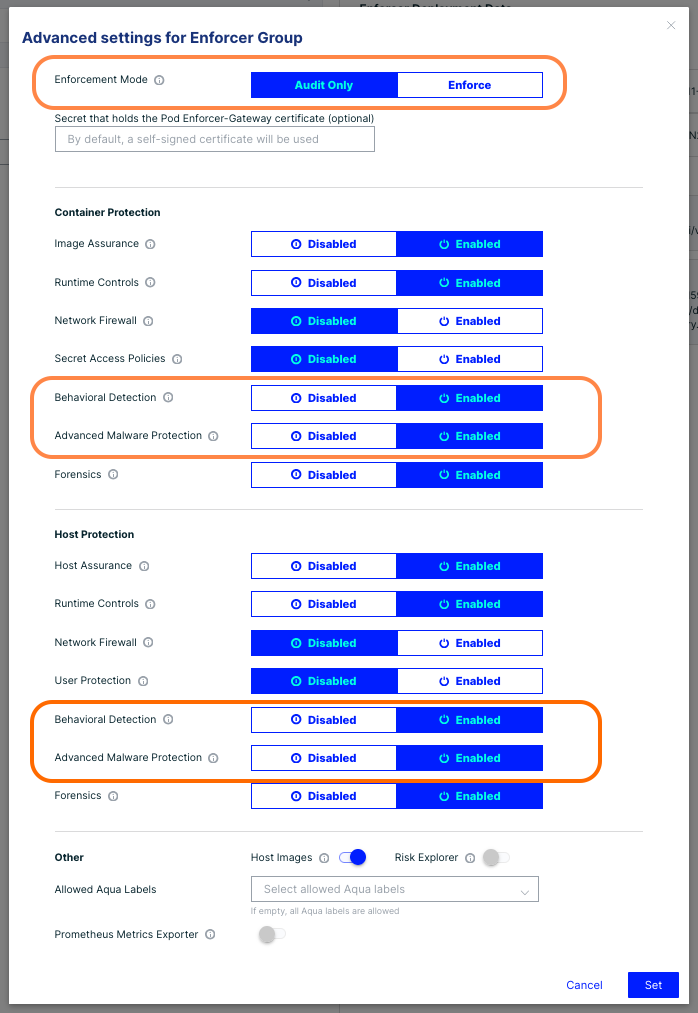
Advanced Malware Protection (AMP):
Using the Advanced Malware Protection engine, we have an updated Signature Set looking for the hash of a "bundle.js" file, which is the known malicious file added to these exploitable packages. These detections will be seen as a standard AMP detection under Audit with a file name of "bundle.js".
Here is the AMP Versioning of that 'updated Signature Set', which is witnessed in the Enforcer Log...
SAVAPI version: 4.15.27.472
Engine version: 8.3.72.0
VDF version: 8.20.63.40
And in the UI under "Workload Protection > Settings > Malware Protection" with version 20250919_1518
Here is the VirusTotal link for the applicable Hash we will see blocked in our audit log :
https://www.virustotal.com/gui/file/46faab8ab153fae6e80e7cca38eab363075bb524edd79e42269217a083628f09
To Configure the AMP Runtime Policy...
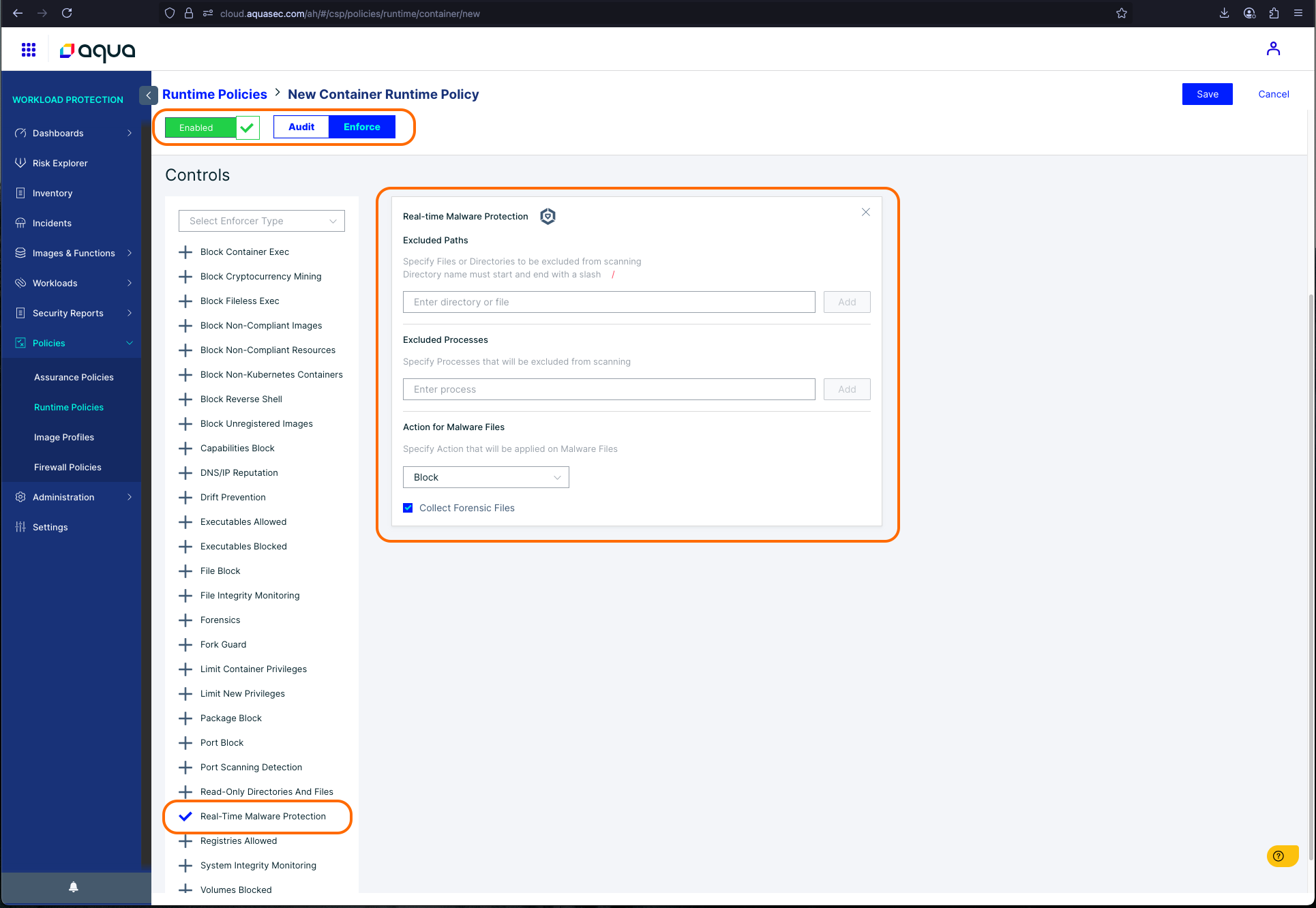
1. Navigate to Workload Protection > Policies > Runtime Policies > "Your Container Policy Name"
2. Ensure the Policy Enforcement Mode is set to "Audit" or "Enforce" as desired.
3. Check the "Real-time Malware Protection" Control
4. Repeat these steps for the "Host Runtime Policy" if also desired - the host control is named identically.
Behavioral Detection:
If Behavioral Detection is enabled on the Host AND/OR Container, We witness these packages trigger the "TRC-51 (Credentials text lookup detected)" signature, with medium severity. No additional Runtime Policy config is needed, unlike AMP.
Adding the following 2 filters to the Audit Log in the UI, should surface events that triggered this signature
Action : Signature-detected
MITRE Technique : Credentials In Files
Did you find it helpful? Yes No
Send feedback